USAccess Program
USAccess Program Pricing
USAccess Billing
Participating in the Program
Steps to Enrolling
Making Appointments at USAccess Centers
Find a USAccess Center
Status of Your Card
Troubleshooting Issues
HSPD-12 Background
Public Key Infrastructure (PKI)
Caring for the USAccess Card
***Tips of the Week that run in each week's Blue Top newsletter now appear at the bottom of this page in separate documents.***
About USAccess Program
Why is GSA offering the USAccess program?
GSA is offering the USAccess program to help reduce the costs for participating agencies associated with procuring FIPS 201-compliant equipment, software, and services.
GSA expects to reduce costs by leveraging the collective buying power of the government through a shared-services approach. Using this approach, the program spreads infrastructure costs among all USAccess program shareholders, which in turn reduces the overall price for each individual participant. Check out the price list for more information on costs associated with the USAccess program.
What are the benefits to participating?
Participants can trust that credentials issued under the USAccess program are secure, reliable, and comply with government-established HSPD-12 standards. The USAccess program also simplifies the process of registering, credentialing, and maintaining the lifecycle of these credentials for each participant, as GSA MSO serves as the executive agent responsible. For more benefits, visit USAccess Program Advantages.
What does the USAccess Service provide to participants?
The GSA MSO is offering the USAccess end-to-end solution as a shared service to federal agencies. By enrolling in the USAccess program, particpants gain access to a standard, end-to-end contractor managed service.
Service components include the required hardware and software to conduct enrollment, credential production, credential issuance, credential activation and credential maintenance. In addition to these components, the USAccess program offers a suite of support services including deployment, training and customer support.
GSA selected Electronic Data Systems (EDS) in 2007 as the prime contractor to provide technology and services in support of the USAccess program. By selecting EDS as its vendor, GSA acquired innovative, yet standardized, end-to-end contractor managed services. Supporting the EDS team in providing HSPD-12 services are Northop Grumman Corp., L-1 Identity Solutions, Data Systems Analysts Inc., and Identification Technology Group.
What do the credentials issued by the program look like? Will the agency be able to influence the look of the credential?
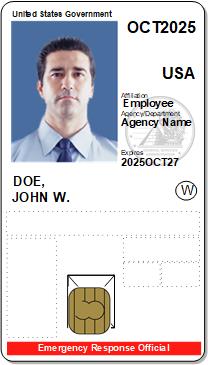
The PIV credential issued by the USAccess program follows the standard set by NIST. As outlined by this standard, each credential contains a set of mandatory information such as the issuing agency seal, a photo of the credential holder, and the credential holder’s physical characteristics. Each agency can add their agency’s logo, as well as a return address in event the credential is lost and needs to be returned.
To view a picture of the credential, check out the About the Credential section of this Web site.
Back to top
USAccess Program Pricing
What are the costs for each agency to participate?
For a complete list of costs associated with the USAccess program, please visit the Pricing information section of this Web site.
Back to top
USAccess Billing
When can I expect my first invoice?
You will receive your first invoice one month after your first service begins. That service may be an enrollment station, credential enrollments, test cards, or any other item from the Pricing Sheet, which can be found on the Fedidcard.gov website: http://fedidcard.gov/priceinfo.aspx.
What information will be on my invoice?
Your invoice will be an Excel spreadsheet. Each tab will display activity by Pricing Item (from the Pricing Sheet) for the billing month. (This invoice is supporting documentation of the billing for your records.)
What do I do once I get my invoice?
Review the spreadsheet to verify your information is correct. If you believe that you have been invoiced incorrectly, please contact Spiro Papagjika (Spiro.Papagjika@gsa.gov) or Marissa Bornholdt (Marissa.Bornholdt@gsa.gov) for assistance.
Are we using IPAC billing?
Yes. Your IPAC billing will be initiated either the same day or shortly after you receive your invoice.
Participating in the Program
Why should I participate in the program?
As outlined in the HSPD-12 directive, each government agency must complete issuing PIV compliant credentials to employees by in October 2008. GSA MSO established the USAccess program to ease participants from the burden of acquiring services, coordinating integration with governments systems, as well as managing contracted vendors. GSA MSO serves as the executive agent for the program and will oversea these functions for the USAccess program.
The USAccess program provides volume discounts of over 500,000 seats that is shared among the federation of USAccess program shareholders. Leveraging the volume and program management requirements allows participants to concentrate on usage of the credential for physcial and logical access controls.
How do I participate in the program?
Participation in the USAccess program is easy. To begin the process, visit the How To Participate section of this Web site to download the GSA InterAgency Agreement form and instructions on how to fill it out. Once you have filled out the form, please return it to Spiro Papagjika at Spiro.Papagjika@gsa.gov.
GSA personnel will then work with you to build an agency-specific configuration (i.e. agency seal, optional fields, and hardware options.)
How soon can I expect to start issuing PIV credentials to my employees?
GSA MSO has developed a phased deployment schedule to assist agencies in rolling out the program and facilitate card production through contracted vendors. USAccess card equipment and deployments are expected to begin in late July 2007 with volume card issuance expected to begin in September 2007.
GSA is currently taking new enrollment applications from agencies and scheduling deployments for later phases on a first come, first serve basis. To enroll and schedule your deployment, please contact GSA's Stephen Duncan at Stephen.Duncan@gsa.gov.
Back to top
Steps To Enrolling
How will I know when it is time to enroll?
Once your information has been entered in to the system and you have been sponsored, you will receive an e-mail from HSPD12Admin@eds.com.The subject line will say “USAccess—Sponsorship complete”. The e-mail will contain instructions on what you need to do to make an appointment at a USAccess Center to enroll for your card, submit proof of ID documents, and get your fingerprints taken.
It also asks you to review how your name appears in the system (it will display this information.) It is important to make sure this information matches what is on your proof of identification documents, for if you need to make changes, you will need to contact your Sponsor prior to visiting a USAccess Center. The email will include the name of your Sponsor should you need to contact him/her.
How will I know where to go to enroll?
Once your information has been entered in the system and you have been sponsored, you will receive an e-mail from HSPD12Admin@eds.com telling you that your Sponsorship is complete (The subject line will read “USAccess—Sponsorship Complete”.)
The e-mail will contain instructions on what you need to do to make an appointment at a USAccess Center to enroll for your card, submit proof of ID documents, and get your fingerprints taken. It will include a link to the GSA Online Scheduling System directing you to select a USAccess Center near you. (Please pay attention to the Center you select, as some are restricted to certain agencies.)
Back To Top
How do I enroll successfully for a USAccess card? What do I need to do?
To enroll successfully for a USAccess card, there are 3 steps you should take before visiting a USAccess center:
- Gather proper identification to bring to your enrollment appointment
- Verify your information was entered correctly in the USAccess system
- Verify your ID documents match the name listed in the USAccess system
Read the following FAQs for specifics on each step to successfully enrolling.
What documents do I need to bring to my Enrollment appointment?
To enroll and register for your USAccess card, you need to present two forms of identification.
Your primary form of identification must be one of the following:
- U.S. Passport
- Driver's License with photo
- Military ID
- Military Dependent ID
Your secondary form of identification can be an additional primary form of identification, or one of the Secondary forms of identification described on the Acceptable Forms of Identification list. Some examples from the list include:
- U.S. Social Security Card
- Birth Certificate (original or certified copy)
- ID card issued by federal, state, or local government agency
- School ID with photograph
- Voter's registration card
Note: If you do not have at least one form of Primary ID and another secondary form of ID, you will not be able to enroll/register for your card.
Review the complete list of acceptable forms of identification within the Training section of this Web site or at http://www.fedidcard.gov/deploytrain.aspx.
Back to Top
What are acceptable forms of Identification?
The following link will take you to the List of Acceptable Forms of Identification document that outlines what GSA has identified as acceptable forms of ID for proof of citizenship for the USAccess Program: http://www.fedidcard.gov/deploytrain.aspx.
Be sure to review this list prior to visiting a USAccess Center, as you will need to present proper proof of identification in order to enroll or pick up your card.
How do I verify my information was entered correctly in the system?
As part of the enrollment process, you will be sent an email acknowledging that you have been sponsored (i.e. your information was entered in the USAccess system.) Contained in this email is how your Personal Identification Information (PII) was entered in the system. The email will come from the hspd12admin@eds.com email account.
Before scheduling an enrollment appointment, verify that the Personal Identification Information entered into the system by your Sponsor is correct. For example, make sure your name is spelled correctly. If you notice any misspelling or typo, you need to contact your Sponsor to update your information in the USAccess system. Do not make an appointment to enroll if your personal information is not correct. It must be corrected before you can be enrolled.
How do I verify that my ID documents match what was entered in the USAccess system?
In order to enroll, you must verify that your full name, as entered by your Sponsor, matches the name listed on the primary and secondary forms of identification you plan to bring to your appointment.
Note: Your ID documents MUST match the name entered in the system. If your information does not match and you go to your appointment, you will NOT be able to enroll, and will be asked to reschedule your appointment.
Some examples of mismatches that require a correction are:
- Apparent typo or transposition of letters in the name (ex. Jmaes vs. James)
- Mismatch between a given name and an alias, nickname or derivative name (ex. Jim vs. James)
- Mismatch between maiden name in one record and married name in the other
- Mismatch of the suffix
If mismatches appear and the system is incorrect, you need to contact your Sponsor (the person who entered your information in the system), who will update your information in the USAccess system.
Once this update is made, you will receive another email to make an enrollment appointment. Once again, verify the personal information on the email to be sure it is correct and matches the names on your identification documents.
If a mismatch occurs, but your ID documents are correct (i.e. you have recently been married), you can bring what is called a Linking Document to your appointment. A 'linking' document can be used to link two names on two ID source documents.
Acceptable linking documents include:
- Marriage certificate
- Certified copy of birth certificate
- Court record of name change
The linking document must have both the former and current legal names on it and both the primary and secondary document must be valid and not expired. For example, a married woman may use both a current driver's license (in the married name) and a certified copy of her birth certificate (in her maiden name) but will be required to bring a linking document, marriage license, with both her maiden name and married name on it.
Back to Top
Making Appointments At USAccess Centers
How do I make an appointment at a USAccess Credentialing Center?
Once sponsored in the USAccess system, Applicants will receive an email prompting them to make an appointment at a nearby USAccess Center. To make the appointment, you will use the GSA Online Scheduling System. The email you receive will contain a link the home page of the GSA Online Scheduling System.
When making this appointment, Applicants should select a Center that is open to their use. There are 2 methods Applicants can use to check availability of USAccess Credentialing Centers.
Read the FAQs below for information on how to check availability of a USAccess Center.
How do I check if a Center is open for my use in the GSA Online Scheduling System?
To determine a center’s availability in the GSA Online Scheduling System:
- Select a Location in the GSA Online Scheduling System
- If a Center is Leased and can only be used by employees or contractors of that Agency, it will have “Only” in the Center location.
- If a Center is a Shared and is open to all Applicants, it will have “Open” in its Center location.
Applicants can also verify a Center’s availability by using the Find a Center tool on the USAccess Program Web site. This tool uses an individual’s starting point in order to find the closest Center. Leased Centers are labeled as “For use by <specific Agency> personnel only”.
Back to Top
How Do I Find a USAccess Center?
How do I find a Center and check a Center’s availability using the Find a Center tool?
- Access the Find a Center tool at: http://www.fedidcard.gov/centerlocator.aspx.
- In the Type field, select the type of Center you wish to search for. Choices are Enrollment or Activation.
- Enter in the City and State where you are located, or the Zip Code. (This tool uses your starting point in order to find a center located near you.)
- In the Within field, select the range of miles you wish to search for. For example, if you select 25 miles, the locator will return a list of centers located within 25 miles of your starting location.
- Click on the Find button.
- The tool will return a list of Centers located near the starting point. View the results to find one nearest you.
If a Center is marked “For use by <Agency> personnel only”, it is a Leased Center and is only open to employees and contractors of that Agency. If you are not affiliated with that Agency, you should select another Center located near you.
You can also click on View Map to get detailed directions to each Center.
- Go to the GSA Online Scheduling System and make an appointment at the Center you have chosen.
Back to Top
Status of Your Card
How can I determine the status of my card?
If you have questions as to the status of your card, please contact your Sponsor. (The name of your Sponsor was included in the e-mail you received instructing you to visit a USAccess Center to enroll.) Your Sponsor has access to the system and can verify where you are in the PIV credentialing process.
How long before I receive my card?
The entire PIV credentialing process can take anywhere from 2 to 6 weeks, from the point of sponsoring and enrolling, to card printing and delivery, to when the Applicant schedules an appointment to pick up and activate the card. There are several things that can affect the process.
To learn the status of your card, contact your Sponsor who can verify where you are in the process. (The name of your Sponsor was included in the e-mail you received instructing you to visit a USAccess Center to enroll.)
How will I know when my card has been delivered?
Once your card has been delivered to the USAccess Center identified by your Sponsor, you will receive an e-mail directing you to make an appointement to pick up and activate your card. The e-mail will come from the HSPD12Admin@eds.com account, with the Subject line "USAccess--Credential Ready for Pick Up".
Note: It is important that you make an appointment at the same USAccess Center identified in the e-mail, as this is where your card is located.
The e-mail also contains a password/PIN that you will need to activate your card. Be sure to bring this PIN with you to your appointment so you can successfully activate your card.
Back to Top
What do I do once my card has been delivered?
When your card has been delivered, you will receive an e-mail instructing you to make an appointment to pick it up and have it activated. The e-mail will come from the Hspd12Admin@eds.com account, with the Subject Line “USAccess - Credential Ready for Pick Up”.
The e-mail will contain instructions on what you need to do to make an appointment at a USAccess Center to pick up your card, a link to the proof of ID documents you will need to present, and the password/PIN that you will need to activate your card. Be sure to bring this PIN with you to your appointment so you can successfully activate your card.
The e-mail will also contain a link to the GSA Online Scheduling System to make an appointment at the Center where your card was shipped. It is important that you make an appointment at the same USAccess Center identified in the e-mail, as this is where your card is located.
Once you have made your appointment, you can get driving directions by using the Find a Center feature on the USAccess Program Web site at http://www.fedidcard.gov/centerlocator.aspx.
Back to Top
Troubleshooting Issues
I received an e-mail telling me my Sponsorship is complete, however my name is not correct. Who do I contact?
It is important that the name displayed in system (and is included in the e-mail you received) matches the name that is on your proof of identification documents that you will need to present to enroll and pick up your card. (See the List of Acceptable Forms of Identification guide at http://www.fedidcard.gov/deploytrain.aspx.
If it does not match, you need to contact your Sponsor. The e-mail should have included the name of your Sponsor so you can contact him/her.
What do I do if I cannot activate my card?
If you made an appointment to activate your card at a USAccess Center and are unable to do so using self-activation, please ask the Registrar working in the USAccess Center for assistance.
If the Registrar is unable to help you at this time (and you didn’t make an appointment to visit the center), you may need to reschedule for another time depending on appointment volume at the Center. We always encourage you to make an appointment first before going to a USAccess Center.
What should I do if my card is damaged at delivery? What should I do if my card is damaged after I have had it for a while?
If your card is damaged at any time, either when you first pick it up or after using it, you will need to contact your Agency Sponsor or your Agency’s Security Officer.
Back to Top
HSPD-12 Background
What is Homeland Security Presidential Directive – 12 (HSPD-12)?
On August 27, 2004, President Bush issued Homeland Security Presidential Directive 12 (HSPD-12) “Policy for a Common Identification Standard for Federal Employees and Contractors." The goal of HSPD-12 is to create a unified standard for all federal government IDs so that they can be used at physical and online access points.
HSPD-12 called upon the National Institute of Standards and Technology (NIST) to develop the actual technical standard, and the Office of Management and Budget (OMB) to manage implementation of the credentials. The uses of the credentials are left to the agencies themselves to decide.
HSPD-12 calls for all federal employees and contractors to use a standard smart credential to verify their identity for secure access to federal buildings and information systems. The directive set October 2008 as the deadline for complying with the order.
What is the purpose of HSPD-12?
The purpose of HSPD-12 is to provide a common reliable identification verification for Government employees and contractors. It will help to protect against a variety of threats including:
- Unauthorized access to physical facilities or logical assets under the protection umbrella of the Personal Identity Verification (PIV) System and in which a PIV credential is employed in access control processes
- Improper issuance of valid credential to malicious holder
- Counterfeiting of credentials
- Intercept or probing to access stored information
- Successful cryptanalytic attacks against stored protected information
- Use of stolen or borrowed credential to gain access
- Intercept/technical surveillance to capture PIN(s)
- Use of credential issued for access to lower sensitivity/criticality assets to achieve access to more sensitive/critical assets
What is the draft Federal Information Processing Standard (FIPS) 201?
FIPS 201 is the technical standard that HSPD-12 required NIST to develop. FIPS 201 is entitled “Personal Identity Verification (PIV) for Federal Employees and Contractors.” The standard requires the collection of fingerprint information and facial information for inclusion on the credential. (Government agencies already use such information to differing degrees depending on the agency.) The credential themselves will contain both a "contact" smart chip and a "contactless" chip, meaning that they can be read by devices that need direct contact with the credential and devices that can read the credential remotely. The final FIPS 201 was issued on February 27, 2005. The second revision, FIPS 201-2 is in draft.
What are the Personal Identity Verification requirements?
- The PIV requires that Federal agencies issue secure and reliable forms of personal identification:
- Based on sound criteria to verify an individual employee’s identity
- Strongly resistant to fraud, tampering, counterfeiting, and terrorist exploitation
- Rapid electronic verification of personal identity
- Identity tokens issued only by providers whose reliability has been established by an official accreditation process
- Applicable to all government organizations and contractors
- To be used to grant access to Federally-controlled facilities and logical access to Federally-controlled information systems
- Not applicable to identification associated with national security systems
- To be implemented in a manner that protects individual privacy
Public Key Infrastructure (PKI)
Do you have a complete certificate profile?
Yes, they are defined in the Common Policy. For ease of use, GSA MSO is working with EDS to complete a human-readable profile of the certificates documented, in Excel spreadsheet form. This will be provided in the near future.
Are all certificates stored in the PIV Container?
Yes, all four (4) PIV certificates are stored in the PIV container.
Can we inject our UPN?
Yes, agencies can inject their UPN either through the Agency-to-SIP interface or through the Sponsorship portal.
What is the plan to support key recovery in support of long term data access of encrypted files?
The PIV application does not have a container for encryption key history. This key pair needs to be placed in another container. EDS will work with ActivIdentity to incorporate support for key history into the CMS and ActivClient PIV products. Providing this capability will take several months to accommodate development and testing. There is no standard methodology for interoperability in this area.
Entrust Managed Services supports key recovery and automatically escrows all encryption/decryption key pairs.
Does the GSA system support Temporary Issuance of credentials including certificates? What name form or restrictions are placed on that certificate?
No, the USAccess system does not issue temporary certificates, therefore name form or restrictions are not applicable.
For termination or suspension of certificates due to unsuccessful background investigation, it is the responsibility of the Agency (i.e. Security Officer) to terminate or suspend the certificate. If the issue is provisional certificates, policies and procedures are already incorporated to accommodate this requirement. If the issue is forgotten passwords, policies and procedures to accommodate this requirement are the responsibility of the Agency.
Does the GSA system support certificate suspension?
Yes. The suspension for certificates is supported through both the Security Officer and Sponsor roles.
Where are Encryption (Key Management) certificates published? Who will have access? Government addresses only or fully exposed?
Certificates are published to the EMSPKI Master Directory, which publishes them to a publicly accessible EMSPKI Shadow Directory.
What documentation is available?
All system-level documentation is provided to the GSA MSO. Agencies may contact the GSA MSO to obtain access to this documentation.
Back To Top
GSA and EDS have mentioned that it is possible to swap out GSA certificates stored on PIV cards with Agency certificates. Please confirm that this is possible.
The solution offered through the GSA MSO does provide the capability to perform post issuance updates of certificates. This functionality allows the users to update their certificates through either an attended or an unattended mode. If Agencies want to “swap out” GSA certificates with their own certificates, they will have to work with the GSA MSO to understand and develop specific requirements.
How are certificate updates to be handled? Card re-issuance or card updates?
The GSA MSO offering provides the capability for users to update certificates utilizing the MyDigitalID Portal on the workstation, which can be accomplished in either an attended or unattended mode (self-service). The Identity Management System (IDMS) will notify users that the certificates will expire based on 90, 60, and 30 days intervals.
Does an update require a visit to a kiosk or activation station? If not, does it require desktop software?
No, it doesn’t require a visit to a kiosk or activation station. Yes, it does require desktop software (ActivClient 6.x). End users have the ability to update in unattended mode using the MyDigitalID Portal or to update in attended mode through the security officer or activation station.
If Agency is using the Entrust Clients, the key history will not be located on the PIV card. Is it possible to create a profile that would support the Entrust Key History methodology while meeting the PIV requirements?
There are multiple vendor solutions to provide a key history methodology and there are ongoing efforts to develop standards that will not be vendor-specific. Currently, the key history methodology employed is dependent on the vendor solutions selected by each Agency. The GSA MSO will work with each Agency to achieve an acceptable solution.
Does the GSA system support certificate suspension? Would this be required to be supported within the Agency PKI?
Yes. The suspension for certificates is supported through both the Security Officer and Sponsor roles. GSA MSO will work with Agencies on support of certificate suspension.
Is there an estimated schedule for how long PKI integration will take once started? Is there an estimate for when GSA MSO/EDS will be ready to look at PKI integration?
The GSA MSO is currently concentrating on deploying the core service. Once the core service is deployed, the GSA MSO team will work with the Agencies that require integration into their own PKIs. The EDS team has experience in incorporating multiple vendor PKIs into the solution and has tested other vendor PKI solutions with the solution. The estimated time varies depending upon the level of integration. In order to become integrated with the GSA MSO solution, the Agency PKI would have to follow the Federal PKI Common Policy Framework.
Is the GSA SSP CA a subCA to the SSP Root CA?
The Entrust SSP CA is subordinate to Entrust Managed Services Root CA.
Is the SSP root CA a subCA off of the Entrust commercial CA or will it be cross-certified with the commercial CA?
The Entrust Managed Services Root CA does not have a trust path to the Commercial Root CA. It is not, and will not be cross-certified with the Commercial Root CA.
Please clarify – is the Entrust Managed Services PKI the Commercial CA? What is the difference between this CA and the Entrust Certificate Services CA?
The Entrust Managed Services (EMS) infrastructure is a separate entity from Entrust Certificate Services. The EMS infrastructure consists of Federal, State & Local, and Commercial infrastructures, but each of these is separate from the others. There is no trust path between the Federal SSP environment and either the S&L or Commercial infrastructures.
Back To Top
Which browsers are the root CA certificate in for which CAs?
None of the EMS CAs are publicly rooted.
What is the DN of the GSA SSP CA?
The DN of the EMS SSP CA is: ou=Entrust Managed Services SSP CA, ou=Certification Authorities, o=Entrust, c=US
Directory Services:
a. Which directory(ies) will the GSA MSO CA write to for posting public certificates and CRLs for certificate status?
The EMS SSP CA writes certificates and CRLs to a Master Directory within the Entrust Managed Services infrastructure. The Master Directory then shadows the directory information to a Shadow Directory that is located in the Entrust Managed Services network and is available via the Internet. As an option, shadow agreements can be created to have the Master Directory shadow to Department/Agency Shadow Directories (assuming that the Department/Agency is able to interoperate with the Critical Path directory product).
b. What is/are the DN(s) and IP address(es) of the directory(ies)?
The Shadow Directory DNS information is:
sspdir.managed.entrust.com 206.132.44.60
If necessary, additional Shadow Directories may be added.
c. Will there be a Directory Information Tree [DIT] for each of the customer Agencies?
Each customer will be contained with a specified branch of the DIT, as required by the Common Policy. According to the Common Policy, the specific OrganizationalUnit within the DN for a Subscriber must be equal to the Department/Agency that employs the Subscriber.
d. What is the name space for each DIT?
As required by Common Policy, the following name space has been defined:
o=U.S. Government, c=US
Within this name space, each Department/Agency will have its own OrganizationalUnit branch based on NIST SP 800-87, Codes for the Identification of Federal and Federally-Assisted Organizations. The following is an example of a GSA branch in the directory:
ou=FAS, ou=General Services Administration, o=U.S. Government, c=US
The first “ou” represents the sub-Agency abbreviation. GSA MSO has requested Agency abbreviation information from Agencies.
e. Is there flexibility for Agencies to be able to keep their current name space, so that their applications will still work?
We are bound by the Common Policy. Any deviation from the Common Policy must be approved by Federal PKI Policy Authority. The GSA MSO will work with each Agency to arrive at an appropriate solution.
f. Can the Agencies arrange for shadow or replicated directories for their own /local use?
The Directory supports shadow directories. This is an option and not part of the core services. As an option, shadow agreements can be created to have the Master Directory shadow to Department/Agency Shadow Directories (assuming that the Department/Agency is able to interoperate with the Critical Path directory product).
g. Will the directory support directory chaining to those Agencies that have PKI repositories or want to have PKI repositories?
Yes, directory chaining is supported.
Back To Top
What do the Agencies need to do to validate the GSA MSO SSP issued certificates?
The EMS SSP publishes CRLs accessible via LDAP and HTTP. In addition, EMS PKI has implemented an OCSP validation authority and responder.
Will the Agencies validate directly with GSA MSO SSP CA directory(ies) or through the SIP?
As noted above, the CA publishes CRLs to the Master Directory. Subscribers do not have direct access to the Master Directory and must retrieve the CRLs from either the Shadow Directory or the HTTP server. The third option is to retrieve certificate validation information via the EMS OCSP responder.
Will the OCSP responder accept a validation request from any trusted OCSP requestor and not require specific relying party software from Entrust?
Entrust client software is not required for the relying parties. The OCSP service has been tested to work with various OCSP requestor products.
Will the OCSP responder accept any validation request without requiring a specific format/context/protocol?
As long as the request is in conformance with the standards for OCSP over HTTP as defined in RFC 2560, it will be processed by the OCSP responder.
CRL/LDAP look up - Does Entrust support all anonymous directory lookups?
Entrust Managed Services supports anonymous bind requests to the Shadow Directories and HTTP servers.
Please describe the key escrow service being provided (offered) for the encryption keys. Is there a fee for “recovery” of encryption keys?
Entrust Managed Services supports key recovery and automatically escrows all encryption/decryption key pairs. There is no fee for “recovery” of encryption keys.
Caring for the USAccess Card
Why Do I Need This Card?
As a Federal employee or contractor, you need your USAccess credential in order to gain access to buildings and systems for which you are authorized. Over time, all existing Federally issued badges will be replaced with a PIV-compliant credential. Without a USAccess credential, you may not be able to enter certain buildings, or will need to be registered as a guest.
How Do I Safeguard My USAccess Card?
As a USAccess credential holder, you have important responsibilities to do your part to safeguard the security of the nation, your fellow employees, and yourself. As part of this, you must treat your card with the same care you would your other identification credentials.
- Do not mark on, punch holes in, or bend your card, as this will void the card warranty and could cause the protective plastic covering to peel away prematurely.
- Do not scratch the magnetic strip on your card.
- Avoid storing your card in areas subject to excessive heat (e.g. clothes dryer) or in direct sunlight (e.g. car dashboards) as the card could warp.
- Do not allow the card near magnetic fields (e.g. stereo equipment, magnets, other magnetic stripe cards, etc.)
- For best protection, please keep your card in your badge holder when not in use.
If you suspect that your card has been affected or tampered with, contact your Agency’s Security Officer or your Sponsor.
For more details about your USAccess card, including your responsibilities and privacy rights as a card holder, read the About The USAccess Credential Guide on the USAccess Program Web site at http://www.fedidcard.gov/deploytrain.aspx.
For information about the recommended badgeholder for use with the USAccess card, see the Pricing section of the USAccess Web site at http://www.fedidcard.gov/priceinfo.aspx.
Back to top